
Android Web SDK Integration
Learn how you can start integrating with Pine Labs Online Android Web SDK.
The Android Web SDK integration involves the following steps below:
Note:
- Ensure you store your Client ID and Secret in your Backend securely.
- Integrate our APIs on your backend system.
- We strictly recommend not to call our APIs from the frontend.
- Failure to adhere to the above guidelines may result in legal implications. In such cases, you will be held responsible for any damage or loss arising from non-compliance.
1. Installation
Install Pine Labs android SDK using Android Studio or IntelliJ. To add the SDK to your app, import the .aar file to the project using the following steps:
- From the Android Studio package manager, select project.
- Create a new directory in a project named
libs. - Download your Android SDK
.aarfile here. - Paste your
.aarfile inside the libs folder
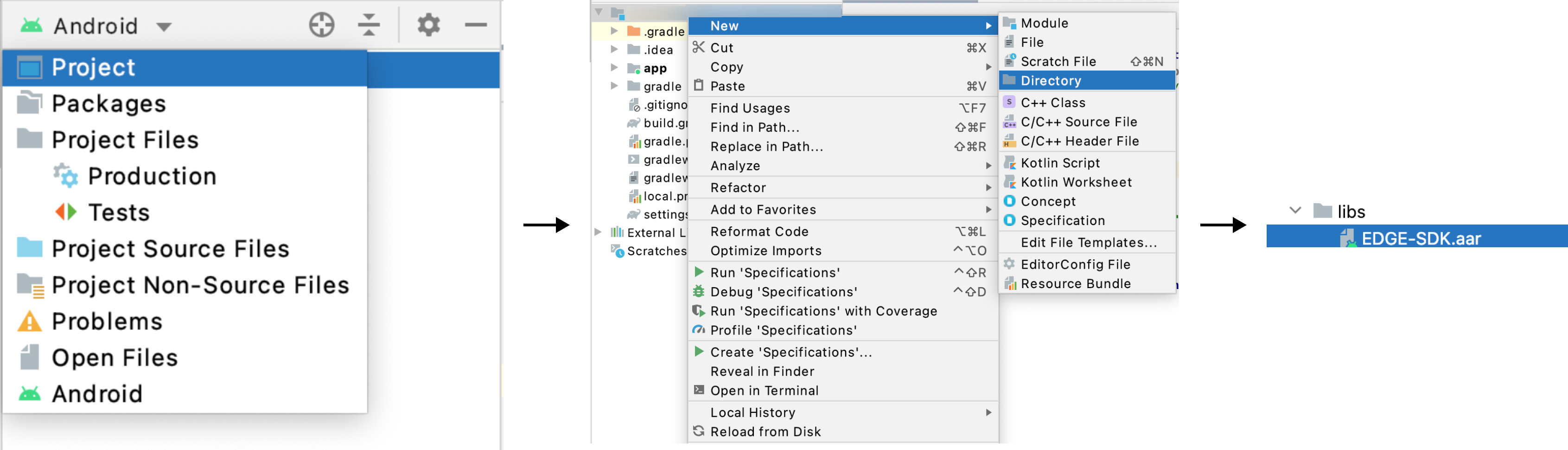
Figure: Installation
Note
- The minimum supported Android version is Android
10or higher.
1.1. Configure Build Setting
- Include the below dependencies in your
build.gradlefile.
implementation files('libs/EDGE-SDK.aar')
- After adding the necessary dependencies to your
build.gradlefile, sync your project. - Next, include the following code in your
AndroidManifest.xmlfile to obtain the required static permissions.
<uses-permission android:name="android.permission.INTERNET"/>

<uses-permission android:name="android.permission.ACCESS_NETWORK_STATE"/>
2. Integrate APIs in Your Backend
Start a payment by triggering the payment flow. To start a payment follow the below steps:
2.1. Generate Auth Token
Integrate our Generate Token API in your backend servers to generate the auth token. Use the token generated to authenticate Pine Labs Online APIs.
Below are the sample requests and response for the Generate Token API.
curl --location 'https://pluraluat.v2.pinepg.in/api/auth/v1/token' \
--header 'accept: application/json' \
--header 'content-type: application/json' \
--header 'Request-Timestamp: 2024-07-09T07:57:08.022Z' \
--header 'Request-ID: c17ce30f-f88e-4f81-ada1-c3b4909ed235' \
--data '
{
  "client_id": "a17ce30e-f88e-4f81-ada1-c3b4909ed232",
  "client_secret": "fgwei7egyhuggwp39w8rh",
  "grant_type": "client_credentials"
}
'
curl --location 'https://api.pluralpay.in/api/auth/v1/token' \
--header 'accept: application/json' \
--header 'content-type: application/json' \
--header 'Request-Timestamp: 2024-07-09T07:57:08.022Z' \
--header 'Request-ID: c17ce30f-f88e-4f81-ada1-c3b4909ed235' \
--data '
{
  "client_id": "a17ce30e-f88e-4f81-ada1-c3b4909ed232",
  "client_secret": "fgwei7egyhuggwp39w8rh",
  "grant_type": "client_credentials"
}
'
{
  "access_token": "eyJhbGciOiJIUzI1NiIsInR5cCI6IkpXVCJ9.eyJzdWIiOiIxMjM0NTY3ODkwIiwibmFtZSI6IkpvaG4gRG9lIiwiaWF0IjoxNTE2MjM5MDIyfQ.SflKxwRJSMeKKF2QT4fwpMeJf36POk6yJV_adQssw5c",
  "expires_in": 3600
}
Click here for request and response parameter information.
The table below lists the request parameters of our Generate Token API.
| Parameter | Type | Description |
|---|---|---|
| client_id required | string |
Unique client identifier in the Pine Labs Online database. Example: a17ce30e-f88e-4f81-ada1-c3b4909ed232Note: The Onboarding team has provided you with this information as part of the onboarding process. |
| client_secret required | string |
Unique client secret key provided while onboarding. Example: fgwei7egyhuggwp39w8rhNote: The Onboarding team has provided you with this information as part of the onboarding process. |
| grant_type required | string |
The grant type to generate an access token. Accepted value: client_credentials
|
The table below lists the response parameters of our Generate Token API.
| Parameter | Type | Description |
|---|---|---|
| access_token | string |
The access token generated by the system. • Minimum length: 1 character. • Maximum length: 8192 characters. Example: eyJhbGciOiJIUzI1NiIsInNote: Use this token in the authorization headers to authenticate Pine Labs Online APIs. |
| expires_at | string |
Access duration timestamp. Example: 2024-06-28T13:26:06.909140Z
|
Refer to our Generate Token API documentation to learn more.
2.2. Generate Checkout Link
Use this API to Generate a checkout link, for authentication use the generated access token in the headers of the API request.
2.2.1. Hosted Checkout
Use the payload below if you specifically want to accept payments via Hosted Checkout (Redirect).
Below are the sample requests and response for a Create Hosted Checkout API.
curl --location 'https://pluraluat.v2.pinepg.in/api/checkout/v1/orders' \
--header 'Authorization: Bearer eyJhbGciOiJIUzI1NiIsInR5cCI6IkpXVCJ9.eyJzdWIiOiIxMjM0NTY3ODkwIiwibmFtZSI6IkpvaG4gRG9lIiwiaWF0IjoxNTE2MjM5MDIyfQ.SflKxwRJSMeKKF2QT4fwpMeJf36POk6yJV_adQssw5c' \
--header 'Content-Type: application/json' \
--header 'Request-ID: c17ce30f-f88e-4f81-ada1-c3b4909ed235' \
--header 'Request-Timestamp: 2024-07-09T07:57:08.022Z' \
--header 'accept: application/json' \
--data '
{
  "merchant_order_reference": 112345171,
  "order_amount": {
    "value": 500,
    "currency": "INR"
  },
  "integration_mode": "SDK",
  "pre_auth": false,
  "notes": "order1",
  "purchase_details": {
    "customer": {
      "email_id": "[email protected]",
      "first_name": "Kevin",
      "last_name": "Bob",
      "customer_id": "192212",
      "mobile_number": "9876543210",
			"country_code": "91",
      "billing_address": {
        "address1": "10 Downing Street Westminster London",
        "address2": "Oxford Street Westminster London",
        "address3": "Baker Street Westminster London",
        "pincode": "51524036",
        "city": "Westminster",
        "state": "Westminster",
        "country": "London",,
        "full_name": "Kevin Bob",
        "adddress_type": "Home",
        "address_category": "billing"
      },
      "shipping_address": {
        "address1": "10 Downing Street Westminster London",
        "address2": "Oxford Street Westminster London",
        "address3": "Baker Street Westminster London",
        "pincode": "51524036",
        "city": "Westminster",
        "state": "Westminster",
        "country": "London",,
        "full_name": "Kevin Bob",
        "adddress_type": "Home",
        "address_category": "shipping"
      }
    },
    "merchant_metadata": {
      "key1": "DD",
      "key2": "XOF"
    }
  }
}
'
curl --location 'https://api.pluralpay.in/api/checkout/v1/orders' \
--header 'Authorization: Bearer eyJhbGciOiJIUzI1NiIsInR5cCI6IkpXVCJ9.eyJzdWIiOiIxMjM0NTY3ODkwIiwibmFtZSI6IkpvaG4gRG9lIiwiaWF0IjoxNTE2MjM5MDIyfQ.SflKxwRJSMeKKF2QT4fwpMeJf36POk6yJV_adQssw5c' \
--header 'Content-Type: application/json' \
--header 'Request-ID: c17ce30f-f88e-4f81-ada1-c3b4909ed235' \
--header 'Request-Timestamp: 2024-07-09T07:57:08.022Z' \
--header 'accept: application/json' \
--data '
{
  "merchant_order_reference": 112345171,
  "order_amount": {
    "value": 500,
    "currency": "INR"
  },
  "integration_mode": "SDK",
  "pre_auth": false,
  "notes": "order1",
  "purchase_details": {
    "customer": {
      "email_id": "[email protected]",
      "first_name": "Kevin",
      "last_name": "Bob",
      "customer_id": "192212",
      "mobile_number": "9876543210",
			"country_code": "91",
      "billing_address": {
        "address1": "10 Downing Street Westminster London",
        "address2": "Oxford Street Westminster London",
        "address3": "Baker Street Westminster London",
        "pincode": "51524036",
        "city": "Westminster",
        "state": "Westminster",
        "country": "London",,
        "full_name": "Kevin Bob",
        "adddress_type": "Home",
        "address_category": "billing"
      },
      "shipping_address": {
        "address1": "10 Downing Street Westminster London",
        "address2": "Oxford Street Westminster London",
        "address3": "Baker Street Westminster London",
        "pincode": "51524036",
        "city": "Westminster",
        "state": "Westminster",
        "country": "London",,
        "full_name": "Kevin Bob",
        "adddress_type": "Home",
        "address_category": "shipping"
      }
    },
    "merchant_metadata": {
      "key1": "DD",
      "key2": "XOF"
    }
  }
}
'
{
  "token": "REDIRECT TOKEN",
  "order_id": "ORDER ID",
  "redirect_url": "https://api.pluralonline.com/api/v3/checkout-bff/redirect/checkout?token=REDIRECT TOKEN",
  "response_code": 200,
  "response_message": "Order Creation Successful."
}
Click here for request and response parameter information.
The table below lists the request parameters of our Create Checkout Link API.
| Parameter | Type | Description |
|---|---|---|
| merchant_order_reference required | string |
Enter a unique identifier for the order request.
1234567890Supported characters:
|
| order_amount required | object |
An object that contains the transaction amount details. Learn more about the order_amount child object.
|
pre_auth | boolean |
The pre-authorization type. Possible values:
|
| allowed_payment_methods | array of strings |
The type of payment methods you want to offer customers. Accepted values:
Note: Ensure it is configured for you. |
| notes | string |
Note to show against an order. Example: Order1
|
| callback_url | string |
Use this URL to redirect your customers to specific success or failure pages based on the order or product details. Example: https://sample-callback-url |
| failure_callback_url | string |
Use this URL to redirect your customers to specific failure pages based on the order or product details. Example: https://sample-failure-callback-url |
| purchase_details | object |
An object that contains purchase details. Learn more about the purchase_details child object.
|
| cart_details | object |
An object that contains cart details. Learn more about the cart_details child object.
|
Order Amount [Child Object]
The table below lists the various parameters in the order_amount child object. This object is part of the Create Checkout Link request object.
| Parameter | Type | Description |
|---|---|---|
| value required | integer |
Transaction amount in Paisa.
1000
|
| currency required | string |
Type of currency. Example: INR
|
Purchase Details [Child Object]
The table below lists the various parameters in the purchase_details child object. This object is part of the Create Checkout Link request object.
| Parameter | Type | Description |
|---|---|---|
| customer | object |
An object that contains the customer details. Learn more about the customer child object. |
| merchant_metadata | object |
An object of key-value pair that can be used to store additional information. Learn more about the merchant_metadata child object. |
Customer [Child Object]
The table below lists the various parameters in the customer child object. This is part of the purchase_details object.
| Parameter | Type | Description |
|---|---|---|
| email_id | string |
Customer's email address.
[email protected] |
| first_name | string |
Customer's first name.
Kevin |
| last_name | string |
Customer's last name.
Bob |
| customer_id | string |
Unique identifier of the customer in the Pine Labs Online database.
123456 |
| mobile_number | string |
Customer's mobile number.
9876543210 |
| country_code | string |
Country code of the registered mobile number.
91Note: If the country code is not provided, it defaults to 91. |
| billing_address | object |
An object that contains the details of the billing address. Learn more about our billing_address child object. |
| shipping_address | object |
An object that contains the shipping address details. Learn more about our shipping_address child object. |
Billing Address [Child Object]
The table below lists the various parameters in the billing_address child object. This is part of the customer object.
| Parameter | Type | Description |
|---|---|---|
| address1 | string | Customer's billing address1.
10 Downing Street Westminster London |
| address2 | string | Customer's billing address2.
Oxford Street Westminster London |
| address3 | string | Customer's billing address3.
Baker Street Westminster London |
| pincode | string | Pincode of the billing address.
51524036 |
| city | string | City of the billing address.
Westminster |
| state | string | State of the billing address.
Westminster |
| country | string | Country of the billing address.
London |
| full_name | string | Full name of the customer.
Doctor Strange |
| address_type | string | Type of the billing address. Example: HomeAccepted values:
|
| address_category | string | Address category. Example: Billing |
Shipping Address [Child Object]
The table below lists the various parameters in the shipping_address child object. This is part of the customer object.
| Parameter | Type | Description |
|---|---|---|
| address1 | string | Customer's shipping address1.
10 Downing Street Westminster London |
| address2 | string | Customer's shipping address2.
Oxford Street Westminster London |
| address3 | string | Customer's shipping address3.
Baker Street Westminster London |
| pincode | string | Pincode of the shipping address.
51524036 |
| city | string | City of the shipping address.
Westminster |
| state | string | State of the shipping address.
Westminster |
| country | string | Country of the shipping address.
London |
| full_name | string | Full name of the customer.
Doctor Strange |
| address_type | string | Type of the shipping address. Example: HomeAccepted values:
|
| address_category | string | Address category. Example: Shipping |
Merchant Metadata [Child Object]
The table below lists the various parameters in the merchant_metadata child object. This object is part of the purchase_details child object.
| Parameter | Type | Description |
|---|---|---|
| express_checkout_allowed_action | string |
Access allowed during the express checkout. Accepted values:
|
Cart Details [Child Object]
The table below lists the various parameters in the cart_details child object. This object is part of the Create Checkout Link request object.
| Parameter | Type | Description |
|---|---|---|
| cart_items | array of objects |
An object that contains the cart item details. Learn more about the cart_itmes child object. |
Cart Items [Child Object]
The table below lists the various parameters in the cart_items child object. This object is part of the cart_details child object.
| Parameter | Type | Description |
|---|---|---|
| item_id | string |
Unique identifier of the item. Example: cart_id_1
|
| item_name | string |
Name of the item. Example: T Shirt
|
| item_description | string |
Description corresponding to the item. Example: Shopping on Diwali Sale
|
| item_image_url | string |
Image URL of the item. Example: https://chriscross.in/cdn/shop/files/95_800x.jpgNote: To ensure better resolution and optimal display on the checkout, please provide the image in 24x24 dimensions.
|
| item_original_unit_price | string |
Original price of the item. Example: 199
|
| item_discounted_unit_price | string |
Discount price of the item. Example: 49
|
| item_quantity | string |
Number of items purchased. Example: 2
|
| item_currency | string |
Indicates the currency type for the purchase of the item. Example: INR
|
The table below lists the various parameters returned in the Generate Checkout Link response objects.
| Parameter | Type | Description | token | string |
Token generated by our system for Pine Labs Online Hosted Checkout. Example: eyJhbGciOiJIUzI1NiIsInR5cCI6IkpXVCJ9.eyJzdWIiOiIxMjM0NTY3ODkwIiwibmFtZSI6IkpvaG4gRG9lIiwiaWF0IjoxNTE2MjM5MDIyfQ.SflKxwRJSMeKKF2QT4fwpMeJf36POk6yJV_adQssw5c
|
|---|---|---|
| order_id | string |
Unique identifier of the order in the Pine Labs Online database. Example: v1-5757575757-aa-hU1rUd |
| redirect_url | string |
The checkout link generated on our system. Example: https://api.pluralonline.com/api/v3/checkout-bff/redirect/checkout?token=< |
| response_code | integer |
Response code of the request. Example: 200 |
| response_message | string |
Corresponding message to the response code. Example: Order Creation Successful
|
Refer to our Create Hosted Checkout API documentation to learn more.
2.2.2. Express Checkout
Use the payload below if you specifically want to accept payments via Express Checkout.
Below are the sample requests and response for a Generate Checkout Link API.
curl --request POST \
     --url https://pluraluat.v2.pinepg.in/api/checkout/v1/orders \
     --header 'accept: application/json' \
     --header 'content-type: application/json' \
     --data '
{
  "merchant_order_reference": "112345",
  "order_amount": {
    "value": 1100,
    "currency": "INR"
  },
  "integration_mode": "SDK",
  "pre_auth": false,
  "allowed_payment_methods": [
    "CARD",
    "UPI",
    "NETBANKING",
    "POINTS",
    "WALLET"
  ],
  "notes": "order1",
  "callback_url": "https://sample-callback-url",
  "failure_callback_url": "https://sample-failure-callback-url",
  "purchase_details": {
    "customer": {
      "email_id": "[email protected]",
      "first_name": "Kevin",
      "last_name": "Bob",
      "customer_id": "123456",
      "mobile_number": "9876543210",
			"country_code": "91",
      "billing_address": {
        "address1": "10 Downing Street Westminster London",
        "address2": "Oxford Street Westminster London",
        "address3": "Baker Street Westminster London",
        "pincode": "51524036",
        "city": "Westminster",
        "state": "Westminster",
        "country": "London",
        "full_name": "harsh kumar",
        "address_type": "HOME/WORK/OTHER",
        "address_category": "BILLING"
      },
      "shipping_address": {
        "address1": "10 Downing Street Westminster London",
        "address2": "Oxford Street Westminster London",
        "address3": "Baker Street Westminster London",
        "pincode": "51524036",
        "city": "Westminster",
        "state": "Westminster",
        "country": "London",
        "full_name": "harsh kumar",
        "address_type": "HOME/WORK/OTHER",
        "address_category": "BILLING"
      }
    },
    "merchant_metadata": {
      "express_checkout_enabled": "TRUE",
      "express_checkout_allowed_action": "checkoutCollectAddress",
      "key1": "DD",
      "key2": "XOF"
    }
  },
  "cart_details": {
    "cart_items": [
      {
        "item_id": "cart_id_1",
        "item_name": "T Shirt",
        "item_description": "Test Description",
        "item_details_url": "https://chriscross.in/cdn/shop/files/95_800x.jpg",
        "item_image_url": "https://chriscross.in/cdn/shop/files/95_800x.jpg",
        "item_original_unit_price": 1,
        "item_discounted_unit_price": 1,
        "item_quantity": 1,
        "item_currency": "INR"
      }
    ]
  }
}
'
curl --request POST \
     --url https://api.pluralpay.in/api/checkout/v1/orders \
     --header 'accept: application/json' \
     --header 'content-type: application/json' \
     --data '
{
  "merchant_order_reference": "112345",
  "order_amount": {
    "value": 1100,
    "currency": "INR"
  },
  "integration_mode": "SDK",
  "pre_auth": false,
  "allowed_payment_methods": [
    "CARD",
    "UPI",
    "NETBANKING",
    "POINTS",
    "WALLET"
  ],
  "notes": "order1",
  "callback_url": "https://sample-callback-url",
  "failure_callback_url": "https://sample-failure-callback-url",
  "purchase_details": {
    "customer": {
      "email_id": "[email protected]",
      "first_name": "Kevin",
      "last_name": "Bob",
      "customer_id": "123456",
      "mobile_number": "9876543210",
			"country_code": "91",
      "billing_address": {
        "address1": "10 Downing Street Westminster London",
        "address2": "Oxford Street Westminster London",
        "address3": "Baker Street Westminster London",
        "pincode": "51524036",
        "city": "Westminster",
        "state": "Westminster",
        "country": "London",
        "full_name": "harsh kumar",
        "address_type": "HOME/WORK/OTHER",
        "address_category": "BILLING"
      },
      "shipping_address": {
        "address1": "10 Downing Street Westminster London",
        "address2": "Oxford Street Westminster London",
        "address3": "Baker Street Westminster London",
        "pincode": "51524036",
        "city": "Westminster",
        "state": "Westminster",
        "country": "London",
        "full_name": "harsh kumar",
        "address_type": "HOME/WORK/OTHER",
        "address_category": "BILLING"
      }
    },
    "merchant_metadata": {
      "express_checkout_enabled": "TRUE",
      "express_checkout_allowed_action": "checkoutCollectAddress",
      "key1": "DD",
      "key2": "XOF"
    }
  },
  "cart_details": {
    "cart_items": [
      {
        "item_id": "cart_id_1",
        "item_name": "T Shirt",
        "item_description": "Test Description",
        "item_details_url": "https://chriscross.in/cdn/shop/files/95_800x.jpg",
        "item_image_url": "https://chriscross.in/cdn/shop/files/95_800x.jpg",
        "item_original_unit_price": 1,
        "item_discounted_unit_price": 1,
        "item_quantity": 1,
        "item_currency": "INR"
      }
    ]
  }
}
'
{
  "token": "REDIRECT TOKEN",
  "order_id": "ORDER ID",
  "redirect_url": "https://api.pluralonline.com/api/v3/checkout-bff/redirect/checkout?token=REDIRECT TOKEN",
  "response_code": 200,
  "response_message": "Order Creation Successful."
}
Refer to our Generate Checkout Link documentation to learn more.
Parameters Used in a Payment
context: Refers to the activity context where this method is called.
redirectUrl: The challenge URL generated when the order creation endpoint is invoked.
callback: EdgeResponseCallback is a constant that handles callback messages sent back to your Android app.
3. Initialize SDK
To initialise the android web SDK, follow the below steps:
- Create an
EdgeManagerobject: Initialise an instance of EdgeManager as shown below in your project.
val edgeManager = EdgeManager()
- Invoke startPayment: Use the
edgeManagerobject to call thestartPaymentmethod, which is defined in the Android SDK.
edgeManager.startPayment(context, redirectUrl, EdgeResponseCallback)
4. Handle Payments
You need to implement call-back methods to handle your payment responses. This will provide the payment status and reason for transaction failures. Based on the reasons for failures, handling can be built at your end. Transaction callbacks can be listened to via overriding methods of EdgeResponseCallback.
onTransactionResponse: This method is called when the transaction is completed. Transaction can be a failure or a success.
internetNotAvailable: This method is called when the internet is not available.
onErrorOccured: This method is called when SDK is unable to load the payment page.
onPressedBackButton: This method is called when the user presses the back button
onCancelTxn: This method is called when the user cancels the transaction.
override fun onInternetNotAvailable(code: Int, message: String?) {
    Toast.makeText(context: this, message, Toast.LENGTH_SHORT).show()
}

override fun onErrorOccurred(code: Int, message: String?) {
    Toast.makeText(context: this, text: "Error occurred ->$message", Toast.LENGTH_SHORT).show()
}

override fun onTransactionResponse() {
    Toast.makeText(context: this, text: "Transaction success", Toast.LENGTH_SHORT).show()
    inquiryDetails(token)
}

override fun onCancelTxn(code: Int, message: String?) {
    Toast.makeText(context: this, message, Toast.LENGTH_SHORT).show()
}

override fun onPressedBackButton(code: Int, message: String?) {
    Toast.makeText(context: this, message, Toast.LENGTH_SHORT).show()
}
5. Manage Transactions
To get the status of the transaction made from your application, you can use our Fetch APIs to know the real time status.
5.1. Get Order by Order ID
Use this API to know the real time status of the transaction made on your application. Refer to our Get Order by Order ID API documentation to learn more.
5.2. Webhooks
You can configure the webhook events to know the status of your transactions. Refer to our Webhooks documentation to learn more.
Updated 30 days ago